The browser
that thinks
with you.
An AI agent that browses, researches and builds for you. Private local AI. A 3D knowledge graph of everything you save. Gmail, Drive and Calendar. And a four-deck DJ console with YouTube — all in one free browser.
Not a chatbot in a sidebar.
An agent that acts.
Press Ctrl + Shift + A and ask in plain English. The agent picks its own tools — searching the web, reading and driving your tabs, filling forms, writing files — and shows which brain is answering: your private local model through Ollama or a cloud model through OpenRouter.
Researches the live web
Searches the real internet, opens the best sources, reads them and answers with citations. It never has to say "I can't browse".
Drives the browser
Opens, switches and closes tabs, reads any page, maps every form field, types into inputs and clicks buttons for you.
Writes & builds
Generates code, documents and whole working projects in a folder you choose, then installs, runs and fixes them until they pass.
Works with your files
Reads local documents (including Word files), rewrites them and saves the result — only in the folders you point it at.
Remembers what you read
Searches your private Rewind archive by meaning, keeps the conversation between launches and keeps a separate memory per site.
Research & Agent Modes
Cross-reference several tabs, spot contradictions and export a cited report — or save named agents (research, shopping, code) that keep their own context.
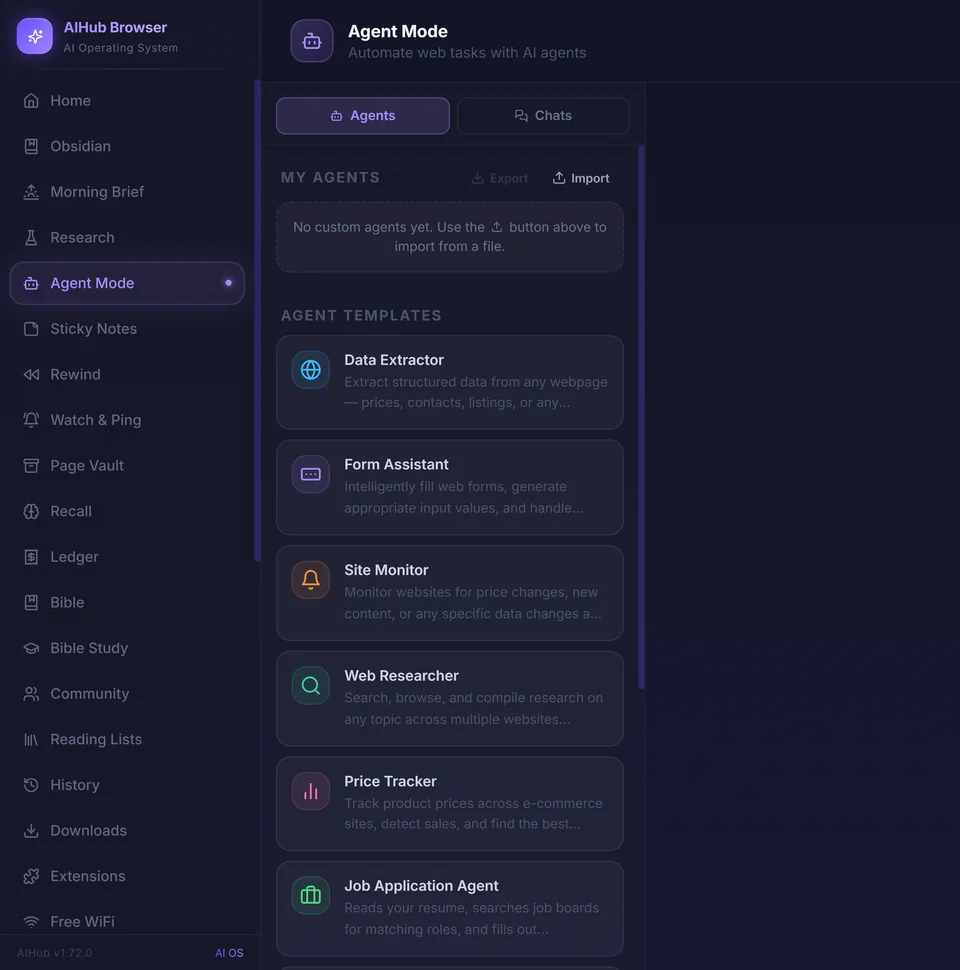
Ten ready-made agents. Or build your own.
Open Agent Mode from the left sidebar, pick an agent and give it a task. It works step by step and shows each step as it goes, and every conversation is saved so you can pick it up later.
- 🌐Data ExtractorPrices, contacts, listings — any repeated content into a clean table.
- 📝Form AssistantFills web forms and multi-step flows with sensible values.
- 🔔Site MonitorWatches pages for price changes or new content and tells you.
- 🔎Web ResearcherSearches, browses and compiles research across many sites.
- 🏷️Price TrackerTracks products across shops, spots sales, finds the best deal.
- 💼Job Application AgentReads your resume, finds matching roles and fills applications.
- 📄Document ReviewerReviews resumes and letters from your files and returns a polished copy.
- ✍️Creative WriterBlog posts, emails, stories, scripts and marketing copy.
- 🧑💻Code ReviewerFinds bugs, suggests improvements and explains tricky code.
- 📈Financial AnalystAnalyses financial data, builds valuations and compares investments.
➕ Custom agents — describe a job once and reuse it forever. Export and import agents as a file, paste images into the chat, and download any conversation or the code it wrote as a ZIP.
Everything you need,
in one browser.
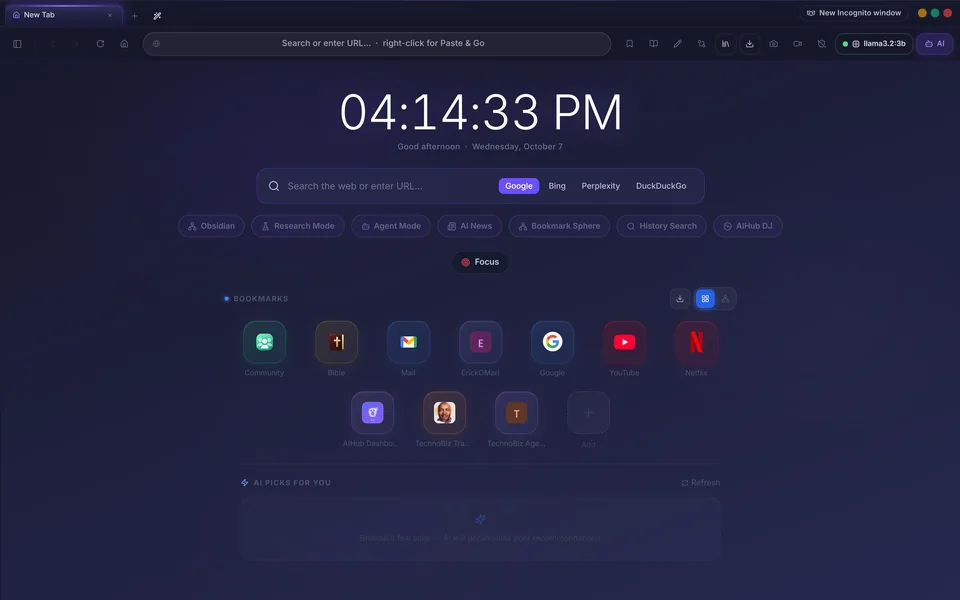
Smart homepage & Bookmark Sphere
Every new tab is part launcher, part memory: universal search, AI picks, a focus timer and your bookmarks as a living 3D constellation with AI-written summaries and automatic topic clusters.
AIHub DJ
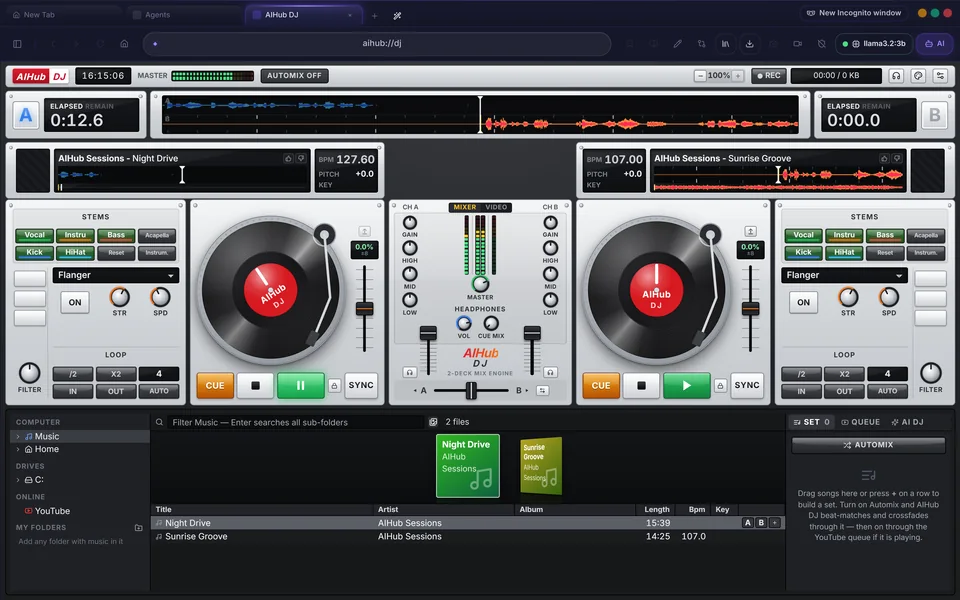
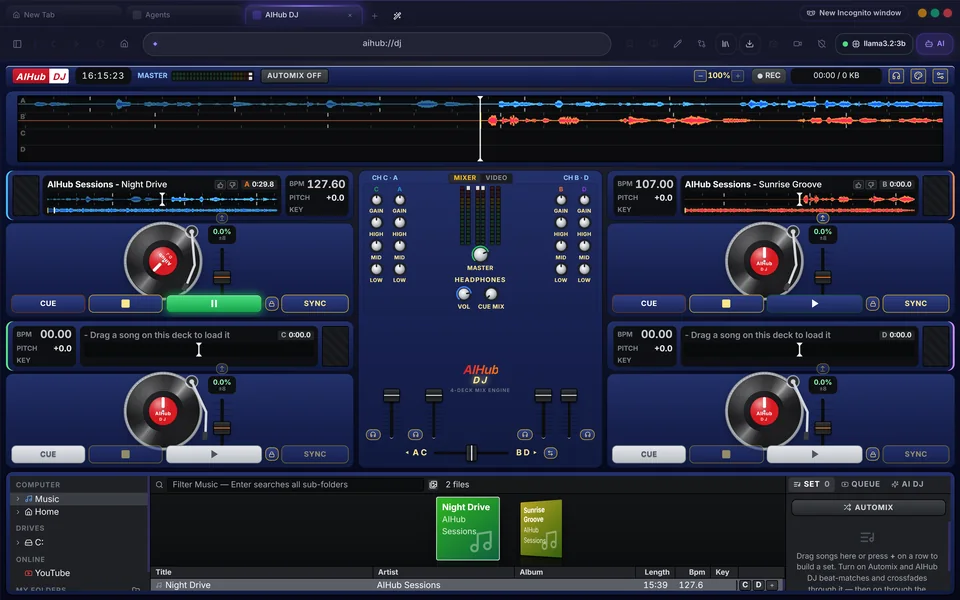
A real DJ console in a tab: up to four decks, YouTube and your own music, scratching, EQ, effects, stems, video and an AI DJ that learns your taste.
Gmail, Drive & Calendar
A native Gmail client plus Drive and Calendar, connected through Google's secure sign-in in your own system browser. Tokens are encrypted on your device.
Privacy that's built in
Ad and tracker blocking, Incognito windows, burner tabs, a credential guard for unfamiliar password pages and a free one-click VPN.
Read, research, remember
AI Reading Mode with read-aloud, Rewind search by meaning, Recall, Page Vault snapshots, PDFs, and a three-pane Research Workspace.
Community rooms
Text and voice channels with screen sharing, inside the browser — under a name you pick, with no email and no password.
Screen Pen & recording
Draw and annotate on any page, leave sticky notes, take full-page or area screenshots and record your screen with a live camera bubble.
Obsidian & encrypted sync
Your reading becomes Markdown notes in your Obsidian vault, with a knowledge graph — and bookmarks sync end-to-end encrypted.
Local AI + Cloud AI —
always your choice.
Ollama runs on your machine for 100% private AI — AIHub can even start it for you. OpenRouter connects to every major model, with no lock-in.
One click to
every tool.
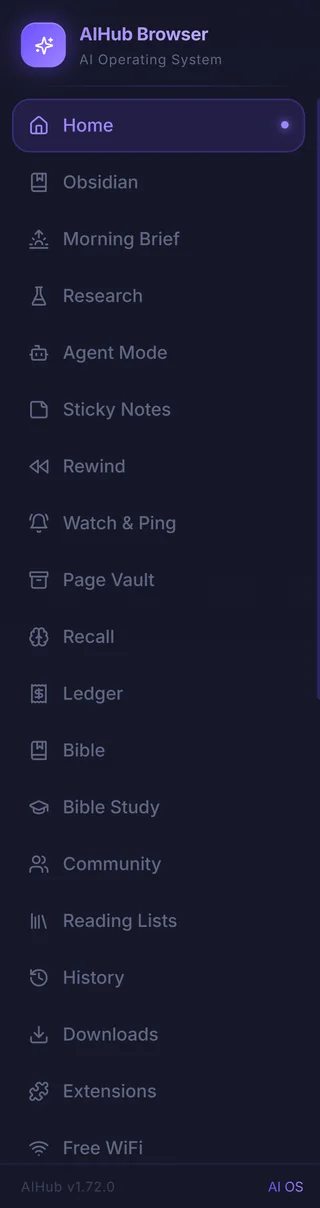
Click the panel button at the top-left and the sidebar opens. Each entry is a full app built into the browser — no extensions, no sign-ups.
Plus the User Manual and Settings — and the AI assistant on the right, one click away on every page.
A free DJ console,
right in your browser.
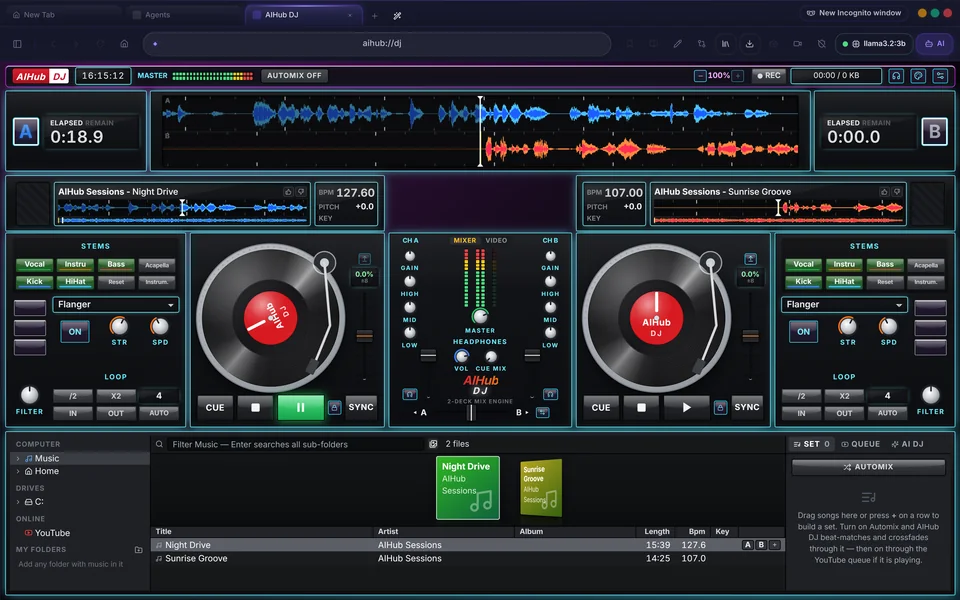
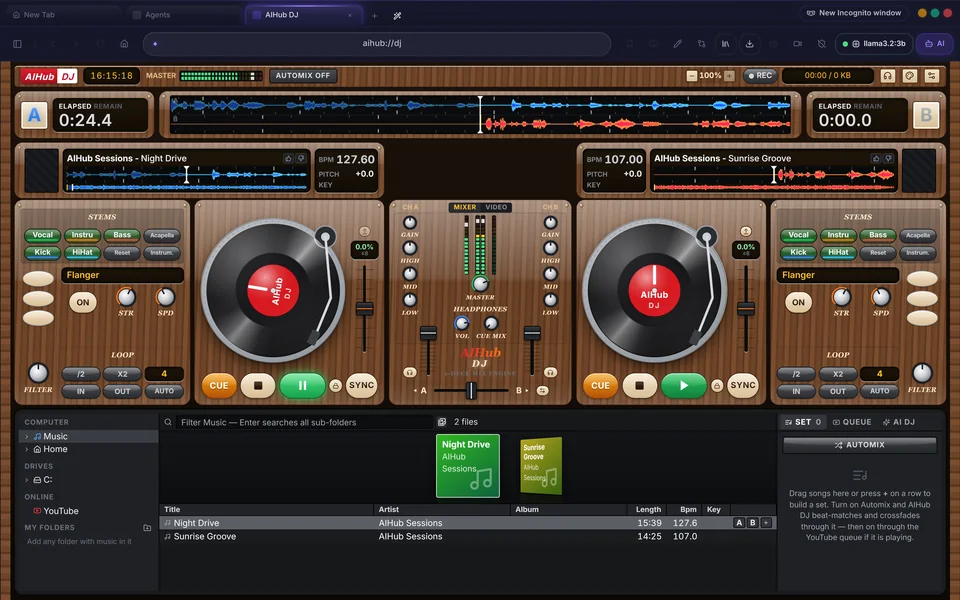
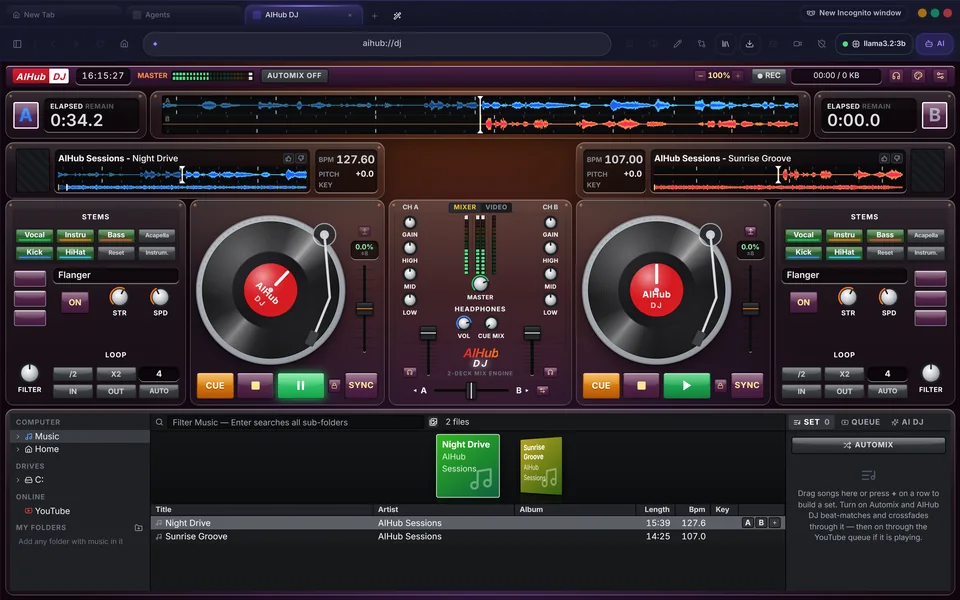
Open aihub://dj and mix. Search YouTube, queue your favourites and let Automix crossfade from artist to artist without a gap — or let the AI DJ take over and play what it has learnt you love.
- Up to 4 decks with EQ, filters, effects and vocal / instrumental stems
- YouTube and your own files — full waveforms, BPM and sync on both
- Real scratching that follows your hand, forwards and backwards
- Video monitor and big screen, blended by the crossfader
- YouTube queue, playlists, favourites and gapless Automix
- AI DJ that learns your taste from what you play, skip and like
- Record your mixes · keyboard control · headphone cueing
- 6 layouts × 5 looks × 18 colour themes
Every feature,
nothing to install.
No extension store and no add-ons to hunt for — all of this ships in the one free download.
🤖 AI & agent
- AI Agent — searches the web, drives tabs, fills forms, writes files and builds projects, with your approval.
- Research Mode — analyse several tabs, cross-reference claims, spot contradictions, export a cited report.
- Agent Mode — named agents with their own instructions and saved conversations.
- Cross-Tab Comparison — up to six tabs laid out in one comparison table.
- Parallel Page Intelligence — the AI reads what you browse and surfaces what matters.
- AI Tab Curator — forty open tabs become an organised workspace in one click.
- Voice to the agent and per-site AI memory.
- Rich AI answers — tables, code and colour, not plain text.
- Local or cloud — Ollama on your machine or any model through OpenRouter.
📚 Reading & research
- AI Reading Mode — clean reading view, AI summaries and read-aloud.
- Rewind — search everything you've read, by meaning, on your device.
- Semantic History — find a page by what it was about, not its title.
- Recall — the ideas you read come back to you, so they stick.
- Research Workspace — notes, sources and report generation in three panes.
- Page Vault — keep a copy of a page even after it changes or disappears.
- PDFs — papers, invoices and manuals open right in the browser.
- Morning Brief — one page for everything that happened while you were away.
- Watch & Ping — a page tells you when it changes.
🧭 Browsing
- Chromium engine — every Chrome site works, including Google sign-in.
- Split view & vertical tabs, tab groups, tab search and tab sleeping.
- Command palette — Ctrl + K to find any tab, bookmark, page or action.
- Smart homepage with universal search and AI picks.
- 3D Bookmark Sphere with smart summaries and automatic categories.
- Sessions, workspaces & containers — sign in twice to the same site.
- Cross-device handoff — move your session to another computer in two clicks.
- Downloads menu with smart sorting.
🛡️ Privacy & security
- Ad & tracker blocking — requests that never leave your machine.
- Incognito windows — one private session, wiped when you close it.
- Burner tabs — a tab that forgets.
- Credential guard — a second look before a password goes somewhere new.
- Free VPN — no account, pick a country, done.
- Wi-Fi — scan and join networks from the sidebar.
- Encrypted keys & tokens, full Chromium sandboxing, no telemetry.
✉️ Productivity
- Gmail, Google Drive & Calendar built in.
- Obsidian vault — your reading as notes you own, with a knowledge graph.
- Ledger — what you actually spent, from receipts you were already sent.
- Tables to CSV — any web table into a spreadsheet in one click.
- Focus Mode & focus sprints that block the sites that derail you.
- Moving to another computer — everything in one backup file.
- Extensions — 14 built in, or describe one and the AI writes it.
🎨 Create, play & connect
- AIHub DJ — 4-deck console with YouTube, scratching, video and an AI DJ.
- Screen Pen — draw, annotate and leave sticky notes on any page.
- Screenshots & screen recording with a live camera bubble.
- Community — text and voice rooms with screen sharing, and public reading lists.
- Trading Coach and a live price tracker for gold, crypto and indices.
- Bible & Bible Study — the whole Bible offline, with courses and memory verses.
- 25 browser themes plus light and dark modes.
Up and running
in three steps.
Download & install
Run the installer for your system. Installed copies keep themselves up to date on Windows and Linux.
Pick your AI
Install Ollama for free, private AI on your own computer — AIHub starts it for you — or paste an OpenRouter key in Settings for cloud models.
Browse smarter
Ask the agent for anything, build your Bookmark Sphere, connect Gmail, open a Community room — or open aihub://dj and start a mix.
"I built AIHub Browser because I was tired of switching between my browser, AI chat, research tools, notes, mail — and even my DJ software. Everything should live in one place. The browser is where you spend most of your time online — it should be the smartest tool you own, not the dumbest."

Frequently asked
questions.
Is AIHub Browser really free?
Yes. AIHub Browser is free to download and use on Windows, macOS and Linux, with no account and no subscription. Cloud AI models through OpenRouter use your own key; local AI through Ollama costs nothing.
Can I use AI without sending my data to the cloud?
Yes. Install Ollama and AIHub runs the AI on your own computer, so nothing you type leaves your machine. You can switch to cloud models through OpenRouter whenever you want.
What can the AI agent do?
It searches the live web and cites sources, opens and reads tabs, fills forms and clicks buttons, reads and writes files in folders you choose, and builds working projects. Any shell command needs your explicit approval, and text inside web pages cannot give it orders.
Is AIHub Browser compatible with Chrome websites?
Yes. It is built on Chromium, so every site that works in Chrome works in AIHub, including Google sign-in.
What is AIHub DJ?
AIHub DJ is a DJ console built into the browser: up to four decks, your own music and YouTube, EQ, effects, stems, real scratching, a video monitor, Automix, a YouTube queue and an AI DJ that learns your taste. It has six layouts, five looks and eighteen colour themes.
Which systems does AIHub Browser run on?
Windows 10 and 11 (64-bit), macOS 11 or later on Intel and Apple Silicon, and Linux as an AppImage. Installed copies update themselves on Windows and Linux.
Get in touch.
Questions about AIHub Browser? Want to collaborate? Send a message.

Erick Omari
Cybersecurity GRC Specialist · Pitchiluxe LLC
Download.
Browse smarter.
Free download. No account. No subscription.
No tracking. Just a better browser.